



BTRFS SHR HDD 환경에서 웹서버를 돌리기에는 너무 느렸습니다. 특히 워드프레스 처럼 복잡한 사이트는 매 작업마다 수십 초씩 지연됐습니다. BTRFS는 안정성이 좋지만 HDD에서는 최악이기 때문입니다.
자잘한 파일이 많은 웹서버는 SSD를 사용해야 하는데, 시놀로지 정품 SSD는 터무니없이 비쌉니다.
현재 NAS 정보
2025년 12월 기준 DSM 7.3.2 입니다.
스크립트 실행
https://github.com/007revad/Synology_M2_volume
여기서 스크립트를 내려받아 NAS에 저장합니다.
SSH로 접속하여 .sh 파일을 실행합니다.
sudo ./syno_create_m2_volume.sh실행 결과
실행 도중 객관식과 주관식 문제가 나옵니다.
Synology_M2_volume v2.1.31
DS723+ DSM 7.3.2-86009

StorageManager 1.0.1-1100

Using options:

Running from: /volume2/app/syno_create_m2_volume.sh

nvme0n1 M.2 Drive 1 - Sandisk WD_BLACK SN770 1TB
WARNING Drive has a cache partition

Unused M.2 drives found: 1

1) SHR 1
2) Basic
3) JBOD
Select the RAID type: 1
You selected SHR1레이드 형식은 SHR을 강력 추천합니다.
You have a choice of Multi Volume or Single Volume Storage Pool
 - Multi Volume Storage Pools allow creating multiple volumes and
   allow you to over provision to make the NVMe drive(s) last longer.
 - Single Volume Storage Pools are easier to recover data from
   and perform slightly faster.

1) Multi Volume (DSM 7 default)
2) Single Volume
Select the storage pool type: 2
You selected Single Volume storage pool멀티 볼륨은 파티션을 분할하여 사용할 때 유용하지만 슬롯이 2개 이하인 NAS에서는 비추합니다.
DS723은 M.2 슬롯이 두 개 뿐이며, 웹서버용으로 사용할 것이므로 싱글 볼륨(2번)을 선택합니다.
1) M.2 Drive 1
Select the M.2 drive #1: 1
You selected M.2 Drive 1장착된 M.2 SSD 목록이 나오는데 여기서는 1개만 설치됐으므로 1번만 있습니다.
Do you want perform a drive check? [y/n]
y

Ready to create SHR 1 storage pool using nvme0n1

WARNING Everything on the selected M.2 drive(s) will be deleted.
Type yes to continue. Type anything else to quit.
yes

Backed up synoinfo.conf

M.2 volume support already enabled.

Starting creation of the storage pool.


When storage manager has finished checking the drive(s):
  1. Create the volume as you normally would:
       Select the new Storage Pool > Create > Create Volume
  2. Optionally enable TRIM:
       Storage Pool > ... > Settings > SSD TRIM

Important
If you later upgrade DSM and your M.2 drives are shown as unsupported
and the storage pool is shown as missing, and online assemble fails,
you should run the Synology HDD db script:
https://github.com/007revad/Synology_HDD_dby를 입력하여 드라이브 검사를 실행하고, yes를 입력하여 초기화합니다.
볼륨 생성
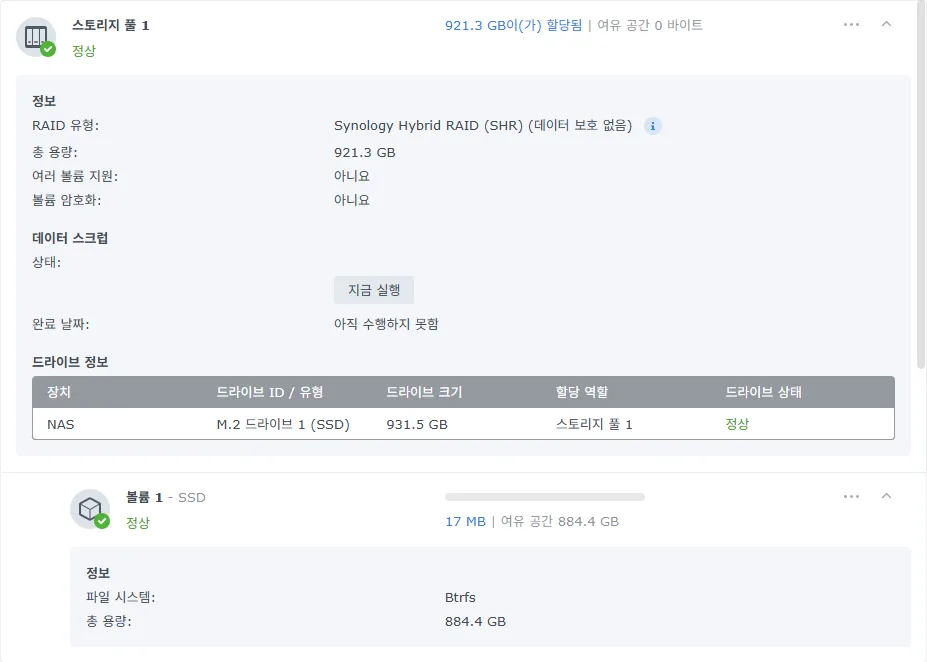
타사 SSD가 스토리지 풀로 인식되었습니다.🎉🎉🎉🤩
볼륨을 생성해 줍니다.
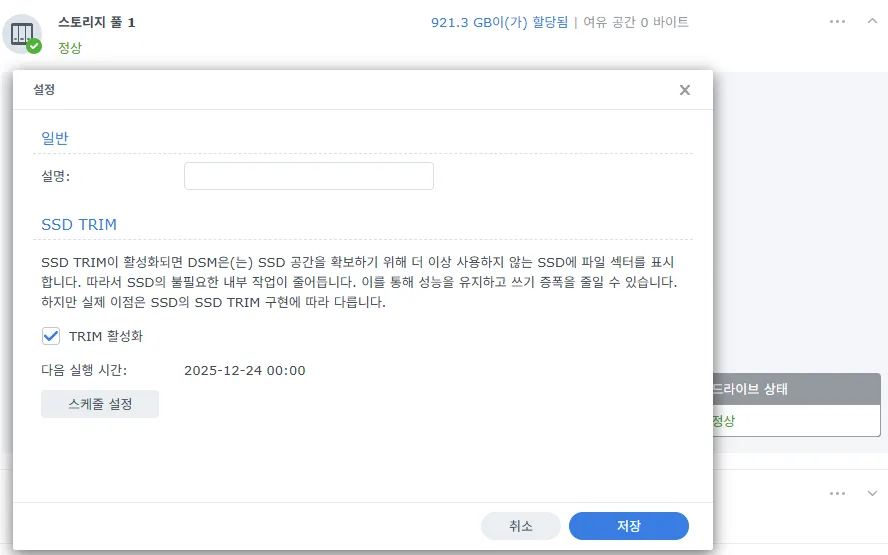
그다음 스토리지 풀 설정에서 TRIM을 설정합니다.
파일 이동
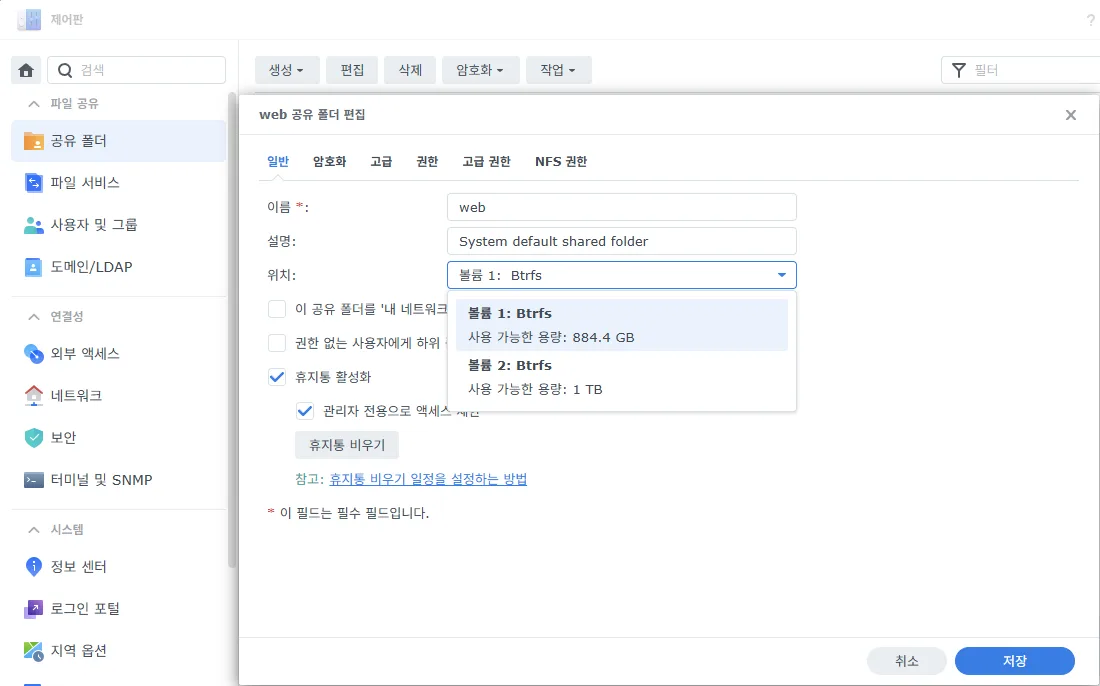
제어판➡️공유 폴더에서 SSD로 옮길 폴더의 속성에서 위치를 변경합니다.
웹 관련 패키지는 Hyper Backup을 사용하여 위치를 옮기면 됩니다.
패키지를 재설치할 때에는 SSD 볼륨을 선택합니다.
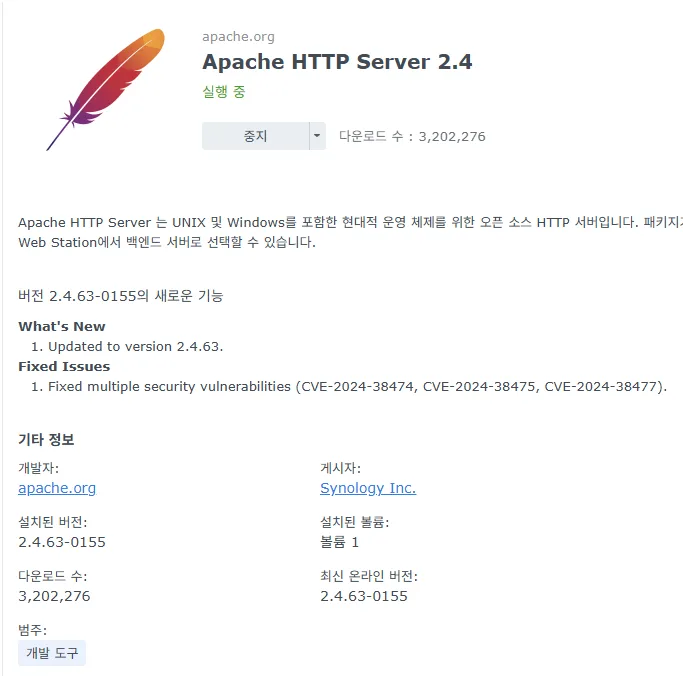
웹 스테이션, 아파치, PHP, MariaDB 등 웹에 관련된 패키지를 모두 SSD 볼륨에 설치했습니다.
설정 변경, 글 편집할 때마다 수십 초씩 걸리던 시놀로지 나스가, 수 초 급으로 어마어마하게 빨라졌습니다.
FAQ
시놀로지에서 타사 NVMe SSD를 제한하는 이유는?
타사 제품을 사용 중 문제가 생기는 것보다, 타사 제품 사용을 막고 욕을 먹는 것이 낫기 때문입니다.
DSM을 업데이트 후에도 타사 NVMe SSD를 저장소로 사용할 수 있나?
현재까지는 스크립트 재실행 없이 그대로 사용할 수 있습니다.
NVMe SSD를 저장소로 사용하면 좋은 패키지는?
웹 스테이션, MariaDB, 웹 관련 패키지 등 용량이 작으면서 수 많은 파일을 읽고 쓰는 프로그램은 SSD에 저장합니다. 백업 및 대용량 파일은 HDD에 저장하면 됩니다.
SSD 저장소 백업 방법은?
Snapshot Replication 패키지로 개별 파일 상태를 백업하고, Hyper Backup으로 파일 및 패키지를 압축 백업하는 것이 좋습니다.
백업 대상 위치는 HDD를 선택합니다.